


Mobile Printer-Print Documents
4.217.00 Reviews
App Specs
- Version
- 1.1.6
- Updated On
- License
- Free
- Downloads
- 100,000+
- Developer
- EZTech Global Limited
- Categories
- Productivity
- Platform
- Android
Screenshots
 Analysis by AppCompare
Printing from a phone sounds simple until a document is trapped in an email, a cloud folder, or a messaging thread and the printer is somewhere else in the room. Mobile Printer-Print Documents is built around that everyday problem: turning a mobile device into a practical starting point for paper documents. I approached it as a productivity tool rather than a replacement for a full desktop printing setup, and that distinction matters. Its value depends less on flashy extras and more on whether it makes the final step from digital file to printed page feel less awkward.
Developed by EZTech Global Limited, this free app sits in the productivity category and is suitable for everyone. It has reached over one hundred thousand installs, with a 4.2 average from more than two hundred ratings. The current version is 1.1.6, and it runs on Android 7.0 or later. Those details make it accessible to a broad range of phones, including older devices that many newer utility apps leave behind. There are optional purchases ranging from $5.99 to $34.99 per item, so I would treat the free download as a way to test the workflow before deciding whether the paid parts are worthwhile.
Mobile printing is the whole point, and that focus helps
The app’s central capability is straightforward: it gives you a mobile route toward printing documents instead of forcing you to move everything to a computer first. That sounds like a small convenience, but it changes the timing of a task. If I receive a form while away from my desk, download a document for a meeting, or need a physical copy of travel information, I can begin from the device already in my hand.
That focus is more useful than a vague promise of being an “all-in-one” tool. I do not need a large office suite when the job is simply preparing a document for paper. The strongest use case is the short chain between finding a file and sending it toward a printer. Every extra transfer in that chain creates another chance to lose the file, open the wrong version, or forget where it was saved.
There is also a practical psychological benefit. Desktop printing often feels like a task that requires setup: sit down, locate the computer, open the right program, check the printer, and then deal with the document. A phone-based workflow makes printing feel more like sharing a file. That is especially helpful for people who do most of their work on a mobile device and only need paper occasionally.
Still, I would not confuse a mobile printing app with a printer itself. The physical printer remains important, and the experience will depend on whether that printer is available and compatible with the route the app uses. The application can simplify the mobile side, but it cannot remove the normal realities of paper, ink, connection problems, or printer settings.
What the capability changes in an ordinary day
The main change is convenience at the moment of need. Imagine receiving a rental form as an attachment while standing in a hallway. Instead of remembering to print it later, I can open it on the phone, prepare it for printing, and handle the paper task while it is still relevant. The same pattern works for a school permission document, a work handout, a return label, or a confirmation that is easier to carry physically.
Worth Reading Before You Choose

EA SPORTS FC Mobile 26 Is a Bigger Football Game, but It Takes Time

Flipboard Shows What News Apps Must Do Beyond the Feed

Switching to Android Auto Means Rethinking Your Driving Routine

Google Calendar Makes a Crowded Week Easier to Manage

Ludo King Makes the Most of the Minutes Between Plans

Baby Panda World Brings Quick Play to Modern Phones, but Its Game Library Feels Busy
This is not only about speed. A phone-first workflow can reduce duplicate copies. I am less likely to download a file to several places simply because I am unsure which device will be available later. That makes the app useful for people who move between home, work, study, and travel, where the phone is the most consistent part of the setup.
For occasional users, the benefit is also easier to understand than the benefits of a full desktop printer utility. You are not adopting a new office system. You are adding a focused step to a task you already understand: choose the document, prepare it, and print it.
How I would use it from file to paper
I would start by organizing the document before sending it to the print stage. This sounds obvious, but it is one of the most useful habits with any mobile printer workflow. I check the filename, open the file rather than relying on a preview, and make sure it is the final version. Phones make it easy to select a similarly named attachment or an older download, and no printer app can correct that mistake afterward.
From there, the app’s role is to keep the document moving toward a physical copy. The exact experience will vary with the phone, file source, and printer, but the sensible workflow is to select the document from where it is stored, review the available print choices, and confirm the destination before starting. I recommend waiting for the printer to be clearly ready rather than tapping repeatedly when nothing happens. Repeated commands are a common way to create duplicate pages.
A useful technique is to treat the first page as a test when the document is important. If the file contains a complicated layout, tables, or images, a quick initial check can prevent wasting a larger print run. This is a general printing discipline, but a mobile screen makes it easier to overlook layout problems because the preview is smaller than a desktop monitor.
I would also keep the original document untouched. If I need to print a form with a particular name or version, I save a separate copy for any changes and leave the source file intact. That makes it easier to retry if the first attempt has a connection issue or if I later discover that a page was missing.
The app is most comfortable when the document is already easy to reach. A file buried inside a long conversation or scattered across several storage locations can still take time to locate. In that situation, the real productivity gain comes from preparing files consistently: use recognizable names, keep final versions together, and avoid printing directly from a temporary download when a clean copy is available.
A realistic scenario where it earns its place
My favorite scenario for this kind of tool is a small home office or shared household printer. One person receives a document on a phone, another person needs the paper copy, and the computer is either switched off or being used for something else. The mobile route avoids interrupting the computer user and avoids sending the file through several unnecessary steps.
Consider a parent who receives a school form during the day and needs to return a signed copy the next morning. The parent can locate the attachment on the phone, check that all pages are present, print it at home, and place it with the other paperwork. The app is not doing the administrative work, but it removes a frustrating device change from the process. That is exactly the kind of modest improvement that can make a utility worth keeping.
It can also suit a small business owner who receives invoices or delivery documents while moving between locations. Printing from the phone means the person does not have to wait until reaching a desk just to create a paper copy. For this user, the advantage is not advanced document editing; it is keeping the print action close to the moment when the document matters.
Travel is another sensible example, although I would be more cautious there. If a trusted printer is available in a hotel, office, or shared workspace, mobile access can be convenient. I would avoid treating a public printer as automatically private, however. Before sending anything sensitive, I would consider who controls the printer and whether the document contains personal or financial information.
Where it compares well with the usual alternatives
The usual alternative is a computer with a printer utility or the operating system’s built-in print service. That route can be better when I need detailed layout control, repeated copies, advanced finishing, or a long document that deserves a larger screen. A desktop also makes it easier to edit the file before printing. For those tasks, the phone is usually the compromise rather than the ideal workspace.
Compared with a printer manufacturer’s companion app, this application’s appeal is its broader, more neutral role as a mobile printing tool. A brand-specific utility may be preferable when I want deep control over one printer model or access to that manufacturer’s maintenance functions. The mobile approach is more attractive when my priority is getting documents from the phone into a printable workflow without building my routine around a single desktop program.
Built-in phone printing can be enough for people who print rarely and already have a reliable setup. In that case, adding another app may feel unnecessary. The difference appears when the built-in route is inconsistent, difficult to find, or inconvenient for the way documents are stored on the device. Mobile Printer-Print Documents has a clearer reason to exist for users who repeatedly begin with phone-based files.
Cloud-based document services offer another alternative. They are excellent for collaboration, version history, and access across devices, but they can add an extra step when the only goal is paper. I see this app as a bridge between the phone and the printer, not as a replacement for cloud storage, word processing, or document management. Using it alongside those tools makes more sense than expecting it to perform every part of the process.
The tradeoff: simplicity versus control
The same narrow focus that makes the app approachable can limit it for demanding work. A person preparing professional brochures, carefully formatted reports, or documents with strict page requirements may prefer a computer. Larger screens provide better visibility, and desktop software generally offers more room for checking margins, page breaks, orientation, and layout before printing.
Mobile printing also depends on a chain of conditions that is easy to underestimate. The phone needs access to the file, the printer needs to be available, and the connection path needs to behave properly. If any part of that chain fails, the app may appear unhelpful even though the underlying problem is the printer or network. My advice is to test the setup with an unimportant document before relying on it for a deadline.
Another tradeoff is the free-plus-purchases model. The app costs nothing to download, which lowers the barrier to trying it, but optional purchases between $5.99 and $34.99 per item mean I would inspect the available choices before assuming every useful function is included. For someone who prints once every few months, paying for extras may not make sense. For regular users, the calculation depends on whether the added convenience replaces a workflow they currently find frustrating.
The age rating of Everyone is reassuring for a household utility, but it should not be read as a promise that every document is appropriate to print or share. The app can be used by a wide audience; the responsibility for sensitive files still belongs to the user. I would be especially careful with identity documents, medical paperwork, and financial records when using any mobile printing route.
Three habits that make the experience more dependable
First, I would create a small “ready to print” folder on the phone. I would place only final documents there, with clear names such as the purpose and date. This turns the app from a file-search tool into the final step of a prepared workflow. It is a simple improvement, but it removes the most common source of hesitation: wondering which attachment is the correct one.
Second, I would use a deliberate confirmation pause. Before starting the print, I check the selected file, page range, number of copies, and printer destination. The pause is especially valuable when the last print job is still in the queue. A mobile screen encourages quick taps, while a printer treats each command as a real physical task.
Third, I would keep a digital backup after printing. Paper can be misplaced, damaged, or handed to the wrong person. The printed copy should be the convenient working version, not the only copy. This is particularly important for forms, receipts, and documents that may need to be printed again with no changes.
A fourth habit is to separate “print now” documents from documents that still need editing. If I open a draft from a messaging app and print it immediately, I risk turning an unfinished file into a permanent mistake. I would edit and save the final version first, then use the mobile printer workflow only after the content is settled.
Who benefits most from this app
The best match is someone who lives on a phone but still needs paper from time to time. Students, parents, remote workers, small business owners, and households sharing a printer can all benefit from removing the computer from the middle of the process. It is particularly appealing when documents arrive through mobile-first channels such as email, messaging, or cloud storage.
It also suits people with older Android phones, since the minimum requirement is Android 7.0 or later. That broad compatibility makes the app easier to consider in a mixed-device household where not everyone has a recent phone. The current version, 1.1.6, is the one I would evaluate on the device I actually plan to use, because printing reliability is more important than simply installing successfully.
I would be less likely to recommend it to a graphic designer, an office administrator handling large batches, or anyone who needs highly precise prepress control. Those users may gain more from desktop publishing software, a printer manufacturer’s advanced utility, or a computer-based workflow. Likewise, if built-in printing already works smoothly on your phone and you rarely print, this app may not change enough to justify another tool.
People who print confidential paperwork should also think carefully about the environment, not just the application. A mobile route is convenient, but convenience should not encourage careless printing at a shared or public device. I would use a trusted printer, collect pages promptly, and remove abandoned jobs from the queue when possible.
My overall view after using the workflow
I see Mobile Printer-Print Documents as a practical bridge rather than a complete office replacement. Its strongest quality is that it respects where many documents actually begin: on a phone. When the need is a quick physical copy and the printer is already available, that focus can save a surprising amount of time and mental effort.
The app is not the right answer for every printing problem. It cannot make a weak printer connection reliable, and it is not the best environment for intensive editing or exact page design. The optional purchases also deserve a look before regular use, especially for occasional printers who may never need more than the basic workflow.
Even with those limits, I would recommend trying it if your current routine involves emailing files to yourself, turning on a computer solely to print, or searching through several devices for the latest document. Start with a harmless file, learn how your printer responds, and build the folder-and-confirmation habits around it. The real advantage is not printing from a phone as a novelty; it is removing one unnecessary device change from an ordinary task.
For a free productivity app from EZTech Global Limited with an Everyone rating and support for older Android versions, it offers a clear reason to exist. I would keep it in the toolbox for mobile-first households and occasional office work, while choosing a desktop or printer-specific solution whenever control, volume, or sensitive document handling matters more than convenience.
Pros
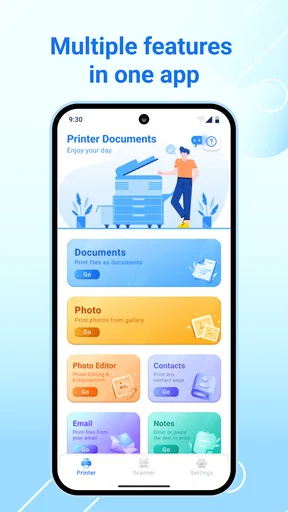
- Prints documents and photos directly from your mobile device.
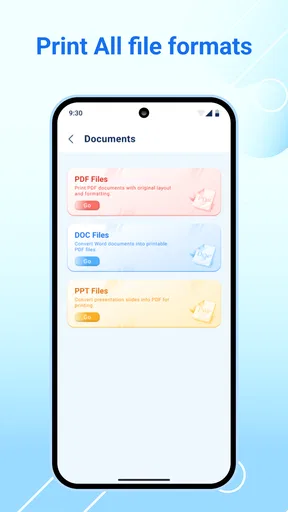
- Supports common file formats for convenient everyday printing.
- Simple interface makes printer setup easy for most users.
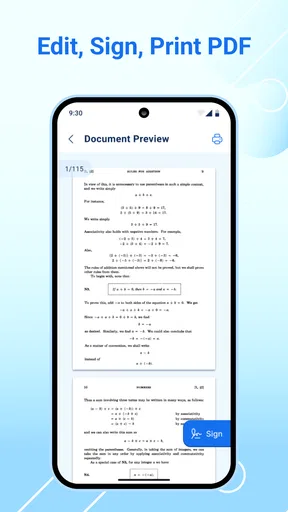
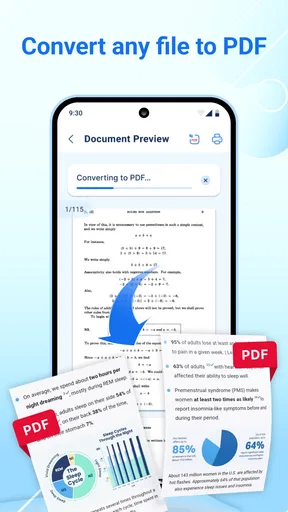
- Useful preview option helps check pages before sending them.
- Can reduce the need to transfer files to a computer first.
Cons
- Printer compatibility may vary depending on the model and manufacturer.
- Some advanced printing options may require a premium upgrade.
- Large documents can take time to load and process.
- Wireless printing depends on a stable Wi-Fi or Bluetooth connection.
- Ads or permission requests may interrupt the printing workflow.
FAQs for Mobile Printer-Print Documents
What is Mobile Printer-Print Documents used for?
Mobile Printer-Print Documents is designed to help you print files, photos, documents, and other content directly from a smartphone or tablet. After installing it, you can select compatible files stored on your device and send them to a supported wireless printer. It is particularly useful when you need a quick printout without transferring files to a computer first.
Which printers are compatible with Mobile Printer-Print Documents?
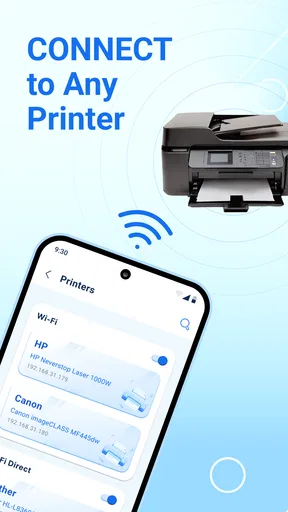
Compatibility depends on the printer model, wireless connection, and the printing technology supported by the application. In general, the printer and mobile device need to be connected to the same Wi-Fi network, although some models may support Wi-Fi Direct or other connection methods. Before downloading, check the app listing and your printer’s specifications to confirm support.
Can I print documents and photos from my phone?
Yes, the application is intended for printing common mobile content such as documents, images, and photographs. Depending on the file type and printer, you may be able to adjust options including paper size, orientation, color, number of copies, and print quality. Some advanced settings can vary according to the connected printer and the permissions granted to the app.
Is Mobile Printer-Print Documents free to download?
The application may be available to download at no initial cost, but the exact pricing model can depend on the Android or iOS version and the developer’s current terms. Some features may include advertisements, optional purchases, or premium tools. Review the store page carefully before installing, especially if you want ad-free printing or access to additional functions.
Why can’t the app find my wireless printer?
If the printer does not appear, first confirm that both devices are connected to the same Wi-Fi network and that the printer is powered on and ready. Restarting the app, phone, router, or printer can also help. Check whether local-network, Bluetooth, or nearby-device permissions are enabled. If the problem continues, verify that your printer model is supported and that its firmware is up to date.


